Practice your talk with Stage Coach
Record a practice run and get the specific, timed coaching notes that make your next talk land.
Walk on stage already knowing your talk works.
Give your talk to your camera. Minutes later you get the notes a speaking coach would give you, pinned to the exact second they happened, plus drills for the parts that need another pass.
- 0–100Stage Score with Message, Voice, and Presence
- 1–3 minfrom “stop” to a full coaching report
- 90 secdrill takes to fix one section at a time
Free 5-minute trial session. After that, $12 a session or $29 a month for 8.
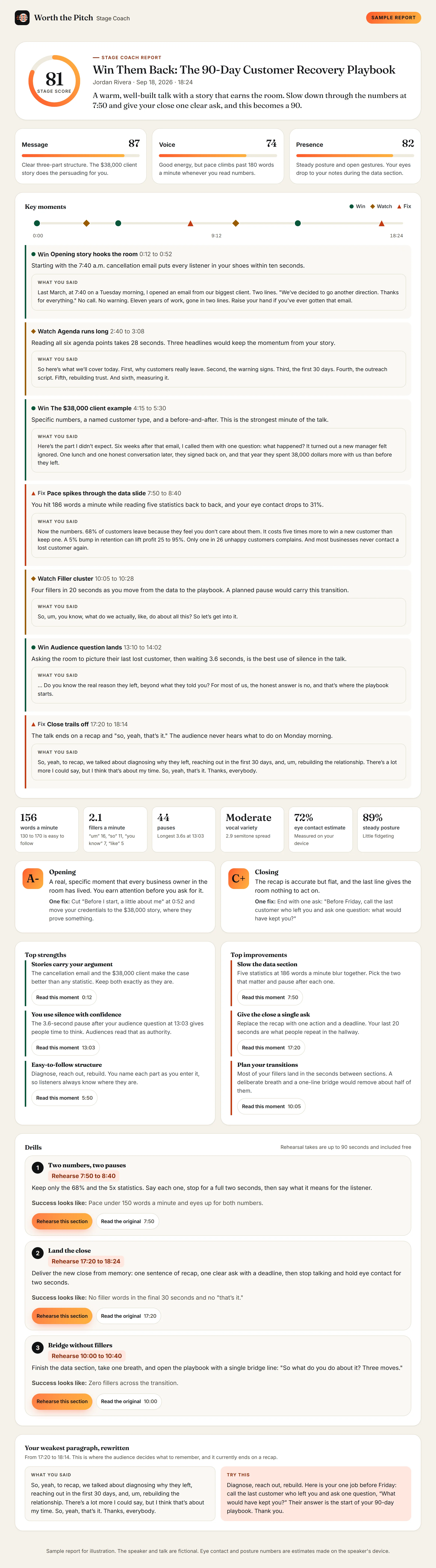
“Win Them Back: The 90-Day Customer Recovery Playbook”
A warm, well-built talk with a story that earns the room. Slow down through the numbers and give the close one clear ask.
- Message87
- Voice74
- Presence82
- Opening story hooks the room in ten seconds
- Pace hits 186 words a minute on the data slide
- Four fillers in 20 seconds at the transition
Most speakers rehearse alone and guess at what to fix. Stage Coach removes the guessing. Record a practice run in your browser, and a few minutes later you get a coaching report with a Stage Score from 0 to 100 and notes tied to the moments they happened.
Why speakers use Stage Coach
- Find the minute that loses the room. Every note is pinned to a timestamp. Click it and hear exactly what the coach heard.
- Break filler habits for good. See your fillers per minute today, then watch the number drop across sessions.
- Fix one section at a time. Drills send you back to a specific stretch, such as 8:20 to 9:05, for a 90-second retake that gets scored.
- Tighten your wording. Your weakest paragraph comes back rewritten in your own voice, ready to use.
- Practice on your schedule. Rehearse at 11 p.m. the night before your keynote. No booking, no audience, no awkwardness.
- Keep it private. Your video stays in your browser. We never upload it.
What the report includes
- A Stage Score and three pillar scores: Message, Voice, and Presence
- A one-sentence verdict and a grade for your opening and your closing, each with one fix
- A timeline of wins, habits to watch, and fixes. Choose a marker to jump to that moment in your replay
- Your pace in words per minute, fillers per minute, pauses, and vocal variety
- An eye contact estimate, posture, and gesture notes
- Two or three drills, each aimed at a specific stretch of your talk, such as "Rehearse 8:20 to 9:05"
- Your weakest paragraph, rewritten in your own voice
Here is what a Stage Report looks like.
This is the complete report from one 18-minute rehearsal. It shows the notes a speaking coach would give, pinned to the second they happened, and the exact words the speaker used at each moment.
- 81 Stage Score, plus Message, Voice, and Presence
- 7 timed moments with the words spoken
- 6 delivery numbers, from pace to eye contact
- 3 drills and a rewritten closing paragraph
Hear what your audience will hear. Start with a free 5-minute session, then read your first report in minutes.
Start my free sessionBuilt for the talks that matter
- Conference sessions. Rehearse the talk you just got accepted to, weeks before the event.
- Keynotes. Polish the opening and the close, where a Stage Score moves the most.
- Webinars and virtual events. Eye contact with the lens is the skill that counts, and Stage Coach measures it.
- Pitches and job talks. Run it three times, compare the scores, and walk in with the best version.
How to record a session
- In your Worth the Pitch dashboard, open the Stage Coach tab and click Start a practice session.
- The first time, read the consent notice, check the box, and type your full name to sign. Your camera stays off until you agree.
- Click Turn on camera and microphone and allow access when your browser asks.
- Frame your head and shoulders, face a window or lamp, and click Start recording. A short countdown gives you time to get ready.
- Give your talk. Click Stop and get feedback when you finish, or press Escape. Recording stops on its own at your session limit.
- Your audio and a few still frames upload, and the report appears in one to three minutes. You can keep using the app while you wait.
Look at the camera lens as if it were the back row. The eye contact estimate counts the moments your head and eyes point toward the camera.
Rehearse a drill
Each drill has a Rehearse this section button. It records a short take of up to 90 seconds and scores it against the same rubric, so you can see whether the habit improved. Rehearsal takes are included at no extra cost, up to six per session.
Track your progress
After two sessions, Stage Coach charts your Stage Score and fillers per minute across your last eight sessions and writes plain summaries such as "Fillers dropped from 11 to 4 a minute." Click Download share card for an image with your score and progress. It never includes your face or voice.
Sessions and pricing
Try it free, then pay only for the practice you need. One session costs less than a single hour with most private speaking coaches, and you can rehearse again the same night.
- FreeOne trial session, up to 5 minutes, on the Free and Basic plans
- $12One full session, up to 20 minutes. It never expires.
- Best value$29 a monthStage Coach add-on: 8 sessions a month, and up to 2 unused sessions roll over. Or $249 a year.
- Included1 session a month on Growth, 4 a month on Pro
Every session includes up to six rehearsal takes of your drills at no extra cost.
Got a talk coming up? Book your rehearsal tonight. Sessions are ready the moment checkout finishes.
Get Stage CoachHow to buy more sessions
- In your Worth the Pitch dashboard, open the Stage Coach tab and click Get more sessions next to your session balance. You can also open the Plans tab and scroll to Stage Coach add-on.
- Choose One session, Stage Coach monthly, or Stage Coach yearly.
- Pay on the secure Stripe checkout page. You return to Stage Coach with your new sessions ready to use.
Manage or cancel the add-on subscription from the Stage Coach page, under your add-on status.
Sessions can run up to 20 minutes. A session is used only when your recording finishes uploading. If the analysis cannot finish, the session is returned to you automatically.
Your privacy
- Your full video stays in your browser for replay. We never upload it, so the replay is available only on the device and browser you recorded with.
- Face and body positions are measured inside your browser and turned into numeric scores right away.
- We receive those scores, your audio for transcription, and up to six still frames. We delete the audio and frames within 24 hours after the analysis finishes or fails.
- Transcripts and reports stay until you delete them, for up to 3 years.
- Delete any session with its trash button. To erase everything, choose Withdraw consent at the bottom of the Stage Coach page. You can download your reports first.
The Speech practice section of our Privacy Policy has the full details.
Troubleshooting
"Camera or microphone access was blocked."
Your browser is blocking the camera or microphone for this site. Click the camera icon in the address bar, allow access, and click Turn on camera and microphone again.
The on-device coach could not load
Some older devices cannot run the presence measurements. You can still record, and presence feedback will rely on the still frames.
I do not see my replay
Replays live only in the browser you recorded with, and we keep the last eight there. Your report, timeline, and notes still work everywhere.
"We could not hear enough speech to coach."
Check that the right microphone is selected in your browser and speak for at least 30 seconds.